Most solar deals are not lost on price. They are lost on a proposal that arrives too late, looks generic, or fails to answer the one question every customer has: will this pay off, and by when? A solar proposal generator tool exists to fix exactly that — turning a raw address into a defensible, branded proposal in minutes instead of hours.
But the tool only helps if you use it well. A fast proposal built on a sloppy roof design or an outdated utility rate creates a different problem: an angry callback eighteen months later when production falls short. This guide walks through how to use a solar proposal generator tool the right way, step by step, and the best practices that separate a proposal that closes from one that gets ignored.
In this guide:
- What a solar proposal generator tool actually does
- The 7-step workflow from address to e-signature
- What information to gather before you start
- 9 best practices that lift close rates
- Common mistakes that wreck accuracy and trust
- How to size batteries and model financing inside the tool
Quick Answer
A solar proposal generator tool turns a property address and energy usage into a client-ready proposal. You enter the address, confirm the roof and shading, size the system, pick equipment, run the energy and financial model, then send a branded proposal for e-signature — usually in 10 to 20 minutes.
What a Solar Proposal Generator Tool Does
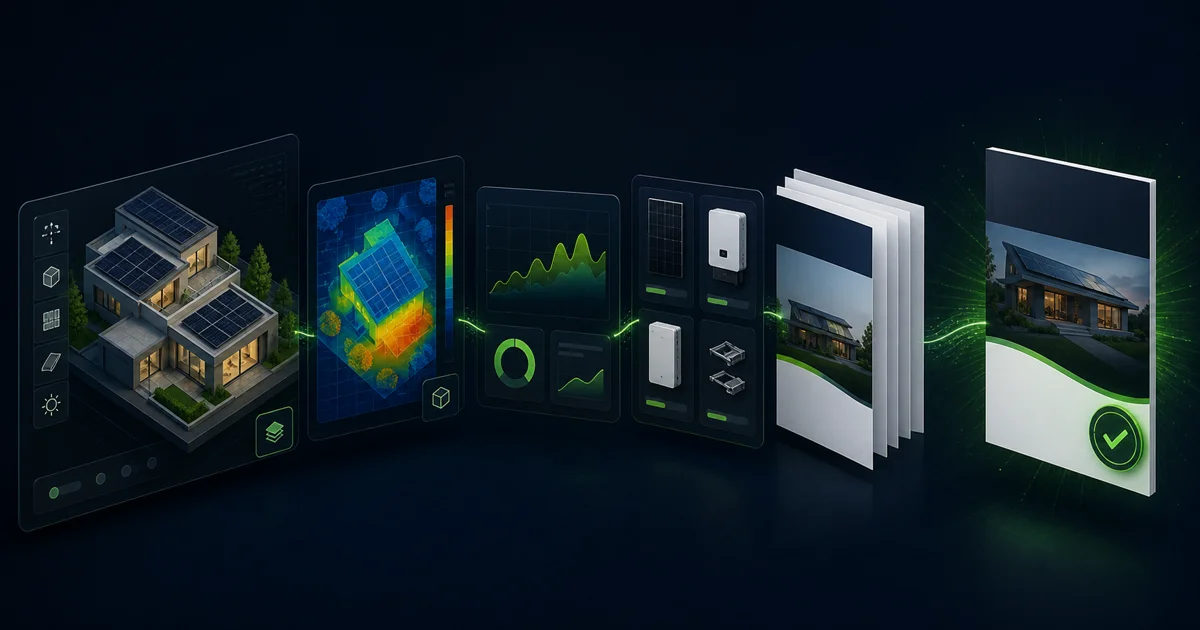
A solar proposal generator tool combines four engines into one workflow: site capture, energy simulation, financial modeling, and document output. You give it an address and some usage data. It gives you a proposal a customer can read, understand, and sign.
The site capture engine pulls satellite or LiDAR imagery and builds a roof model. The simulation engine runs an hourly energy yield against local weather and shading. The financial engine applies utility rates, incentives, and financing to calculate savings and payback. The output engine wraps all of it in a branded PDF or interactive web page with e-signature built in.
The difference between this and a spreadsheet is not just speed. It is consistency. Every proposal uses the same pricing rules, the same production methodology, and the same layout, so your numbers hold up when a customer compares three bids. This is the core of how modern solar proposal software replaced manual quoting.
In 2026, the best tools add AI-assisted panel placement that detects roof obstructions automatically, according to platform documentation from Aurora Solar and OpenSolar. That cuts the slowest part of the old workflow — manually drawing every module around vents and chimneys.
What You Need Before You Start
The minimum input is a property address. That alone lets the tool retrieve imagery and irradiance data. But a proposal built on the address alone is a guess. To produce something defensible, gather more.
The single most valuable input is the customer’s recent electricity bills. Bills give you actual consumption in kWh, the utility tariff, and any time-of-use pattern. Without them, you are sizing against an estimate, and a system sized to the wrong consumption either underdelivers or oversizes the cost.
Use this checklist before you open the tool:
- Property address — exact, so the imagery loads the right roof
- 12 months of electricity bills — for real consumption and the current tariff
- Annual consumption in kWh — the anchor for system sizing
- Known shading — trees, neighboring buildings, rooftop units
- Battery interest — backup goal or self-consumption target
- Financing preference — cash, loan, or lease, since this changes the headline number
A proposal sized against 12 months of real bills beats one sized against a regional average every time. The bill data also lets you model net metering or export compensation correctly, which is often the largest single driver of payback.
How to Use a Solar Proposal Generator Tool: 7 Steps
Here is the workflow most modern tools follow. The labels differ between platforms, but the sequence is the same. A clean residential proposal takes 10 to 20 minutes once you know the flow.
- Enter the address and confirm the roof. The tool pulls imagery and outlines the roof. Check that the outline matches the real structure and fix any planes the AI missed.
- Mark obstructions and shading. Place vents, chimneys, and skylights. Add nearby trees and buildings so the shade model is honest. This step protects you from over-promising production.
- Size the system against consumption. Set the target — offset a percentage of the bill, fill the usable roof, or hit a specific kWp. The tool places modules within setbacks automatically.
- Select equipment from the database. Pick the module, inverter, and racking. Live pricing flows into the cost model, so your margin stays consistent across proposals.
- Run the energy and financial model. The tool simulates hourly yield, then applies the utility rate, incentives, and financing to produce annual savings, payback, and lifetime value.
- Review every number before you generate. Sanity-check production per kWp, the offset percentage, and the payback. If a figure looks too good, it usually is.
- Generate and send for e-signature. Output the branded proposal and send the link. Many tools now deliver by SMS so the customer can open and sign on their phone.
The order matters. Skipping the shading step to save two minutes is the most common way installers produce a proposal that wins the deal but loses the customer later.
Build accurate proposals in minutes, not hours
SurgePV handles design, shade analysis, energy simulation, and financial modeling in one workflow — then outputs a branded proposal your customer can sign on their phone.
Book a DemoNo commitment required · 20 minutes · Live project walkthrough
9 Best Practices That Lift Close Rates
The tool generates the proposal. These habits decide whether it closes.
1. Use real shading, not a default
The fastest way to lose trust is an inflated production number. Run the shadow analysis with actual trees and obstructions placed. A proposal that under-promises slightly and over-delivers builds referrals. The reverse builds callbacks.
2. Anchor the system size to real bills
Size to the customer’s actual 12-month consumption, not a round number. A 7.2 kWp system that offsets 92% of a documented bill is more persuasive than a “nice round 8 kW” that offsets an unknown amount.
3. Lead with payback, not panel count
Customers do not buy panels. They buy a payback period and a monthly saving. Put those numbers on the first screen of the proposal. The technical detail belongs lower down for the customers who want it.
4. Show financing the customer can act on
A cash price alone narrows your market. Model a loan option with the real monthly payment next to the current electricity bill. When the loan payment is lower than the bill, the decision becomes obvious.
5. Keep branding and layout consistent
Use the same template on every proposal. Consistency reads as competence. A customer comparing three bids notices the one that looks like it came from a real company.
6. Deliver speed without skipping accuracy
The first accurate proposal to arrive often wins, and quote-to-decision windows are short in competitive markets. Aim for same-day turnaround from site visit to sent proposal, but never trade away the shading or rate accuracy to get there.
7. Use current utility rates
Rates change. A proposal built on last year’s tariff understates or overstates savings. Confirm the tool is pulling the live rate, especially for time-of-use schedules where export timing drives the math.
8. Model the battery as a scenario, not an afterthought
If the customer mentioned backup or outages, show a solar-plus-battery scenario beside the solar-only one. Let the numbers make the case rather than a hard upsell.
9. Review before you send, every time
Two minutes of sanity-checking production per kWp, offset, and payback prevents most embarrassing errors. The tool is fast, but it does not know your local roof quirks. You do.
What Most Installers Get Wrong
The biggest mistake is treating the generator as a black box. Installers enter an address, hit generate, and send whatever comes out. The tool is only as good as the inputs and the review.
The second mistake is over-optimizing the production number to win the bid. A system that looks 8% better on paper because the shading was skipped will underperform in year one. That gap surfaces in monitoring, the customer notices, and the referral never comes. The honest proposal is the profitable one over a five-year horizon.
A third, quieter mistake is ignoring the financing story. Many installers present a single cash price and wonder why mid-income customers stall. The objection is rarely the system. It is the upfront cost. A loan option that beats the current bill removes the objection without dropping margin.
The exception worth naming: for commercial and industrial sites, the proposal logic shifts toward demand charges, depreciation, and offset against a complex tariff. Residential best practices do not transfer cleanly. Treat C&I proposals as a separate workflow with their own review.
Sizing Batteries and Modeling Financing
Battery sizing inside a proposal tool follows one of two goals: backup or self-consumption. For backup, you set the critical loads the customer wants to run during an outage, and the tool sizes capacity to cover them for a target number of hours. For self-consumption, you size the battery to store daytime surplus and discharge it during expensive evening hours.
Under a flat tariff, a battery rarely pays back on economics alone, and you should say so. Under a steep time-of-use tariff, the same battery can shift enough load to evening peak that the payback becomes real. The tool should show both the solar-only and solar-plus-battery payback so the customer sees the difference rather than taking your word for it.
For financing, model the loan with the actual term and rate, not a placeholder. The number that moves a deal is the monthly loan payment set directly against the current electricity bill. When you run the ROI inside a connected generation and financial tool, the savings, payback, and financing all update together, so the proposal stays internally consistent. For the underlying methodology, our guide on how solar quote software works breaks down the calculation chain in detail.
Free vs Paid Generator Tools
Accuracy comes from the engine, not the price tag. OpenSolar is the most full-featured free option in 2026, with 3D modeling, shading analysis, and proposal generation at no licensing cost, according to OpenSolar’s product pages. Aurora Solar is the most widely adopted paid platform for U.S. residential design.
The real tradeoff is not accuracy. It is control and support. Free tools tend to offer fewer integrations with your CRM, less control over pricing rules and branding, and limited support when something breaks mid-deal. Paid tools justify their cost when proposal volume is high enough that small efficiency gains and integration savings outweigh the subscription.
Pick based on your volume and workflow, not the sticker price. A free tool that adds 15 minutes of manual cleanup per proposal costs more than a paid tool at 30 proposals a month. For a structured comparison, see our roundup of the best solar proposal software.
Conclusion
A solar proposal generator tool is only as strong as the way you use it. Get these three things right:
- Feed it real data. Twelve months of bills and honest shading beat any default setting in the tool.
- Lead with the answer. Put payback, monthly savings, and a financing option the customer can act on at the top of every proposal.
- Review before you send. Two minutes of sanity-checking protects the trust that drives referrals.
Speed wins deals, but only when the numbers hold up. Build proposals that are both fast and defensible, and the close rate follows.
Frequently Asked Questions
What is a solar proposal generator tool?
A solar proposal generator tool is software that turns a property address and energy usage into a complete, client-ready solar proposal. It pulls satellite imagery, designs a panel layout, simulates energy production, applies local utility rates and incentives, and outputs a branded PDF or interactive web proposal with savings, payback, and financing in minutes.
How do you use a solar proposal generator tool step by step?
Enter the customer’s address, confirm the roof outline and obstructions, set the system size against their consumption, pick equipment from the pricing database, run the energy and financial model, then generate the proposal. Finally, review the savings figures for accuracy and send the proposal for e-signature. The full process takes 10 to 20 minutes in most modern tools.
What information do you need before generating a solar proposal?
At minimum you need the property address. For an accurate proposal, also gather the customer’s recent electricity bills, their utility tariff, monthly or annual consumption in kWh, and any known shading from trees or nearby buildings. Battery interest and financing preference help the tool model the right scenarios.
Are free solar proposal generator tools accurate enough?
Free tools like OpenSolar can produce accurate proposals because the engine quality, not the price, drives accuracy. Accuracy depends on real shading simulation, hourly weather data, and current utility rates. The tradeoff with free tools is usually fewer integrations, limited support, and less control over branding and pricing rules.
How long does it take to create a solar proposal with a generator tool?
A standard residential proposal takes 10 to 20 minutes once you know the workflow. Speed depends on how clean the roof imagery is, whether utility rate data loads automatically, and how much manual design correction the roof needs. Complex roofs or commercial sites take longer.
What makes a solar proposal convert better?
Proposals convert when they answer one question fast: will this pay off, and by when? Show a clear payback period, monthly savings, a financing option the customer can act on, and a realistic production estimate you can defend later. Speed of delivery matters too — the first accurate proposal to arrive often wins.
Can a solar proposal generator size a battery and not just panels?
Yes. Modern tools size battery storage against backup goals or self-consumption targets, then model how the battery changes savings under time-of-use rates. You set the backup load or capacity, and the tool shows the cost and payback impact alongside the solar-only scenario.